Typos and bad grammar used to give phishing away. AI fixed that. Here are the warning signs that still work, and the habits that stop attacks even when the email looks perfect.
For years, the advice was simple: watch for spelling mistakes, strange grammar and generic greetings. That advice is out of date. AI tools now let criminals write clean, convincing phishing emails in seconds, personalized with your name, your vendors and details pulled from LinkedIn or your website.
The good news is that the most reliable warning signs were never about grammar. They’re about what the message asks you to do. Train your eye on those, and add a few simple habits, and polished phishing loses most of its power.
The warning signs that still work
- Urgency or secrecy: “I need this before 3 p.m.,” “don’t mention this to anyone yet,” “your account will be closed today.” Pressure is the attacker’s main tool.
- A request that skips the normal process: a new vendor paid outside your usual approval, gift cards for a client, a password shared by email.
- Changed payment details (see how to protect against them): “we’ve switched banks, please update our account.” This is the single most expensive email a small business can get.
- A sender address that’s almost right: rnicrosoft.com instead of microsoft.com, a vendor’s name on a Gmail address, or a reply-to address that doesn’t match the sender.
- Links and files you weren’t expecting: a shared document, a voicemail attachment or an invoice from someone who doesn’t normally send them.
- A sign-in page right after clicking a link. If an email leads to a login screen, close it and go to the site yourself.
New tricks to know about
- QR code phishing: a QR code in an email or PDF that leads to a fake login page. Phones often have less protection than computers, which is exactly why attackers use it, and why managing company phones matters.
- MFA fatigue: a flood of sign-in approval prompts, hoping someone taps “Approve” just to make them stop. If you didn’t try to sign in, never approve, and tell IT immediately. (It’s also why MFA is number 1 in our 10-Minute Security Check.)
- Voice and video impersonation: a call or voice message that sounds like an executive, asking for an urgent payment. AI can now imitate voices from short public recordings.
- Conversation hijacking: an attacker who has broken into a vendor’s email replies inside a real, existing thread. The history looks legitimate because it is.
Habits that stop attacks, even when the email looks perfect
- Verify by a second channel. Any request involving money, passwords or sensitive data gets confirmed by phone, using a number you already have, never the one in the message.
- Slow down on urgency. A real boss or vendor will understand a five-minute call to confirm.
- Report, don’t just delete. Use your email’s “Report phishing” button so IT can block the same message for everyone else.
- Speak up fast if you clicked. The first few minutes matter most, and nobody should be afraid to say so.
What your IT setup should be doing
People are the last line of defense, not the only one. Every organization should also have:
- Advanced email filtering that checks links and attachments when they’re opened, not just when they arrive.
- Impersonation protection that flags lookalike domains and messages pretending to be your executives.
- SPF, DKIM and DMARC on your domain, so criminals can’t easily send email that pretends to come from you.
- Multi-factor authentication on every Microsoft 365 or Google Workspace account, with phishing-resistant options for administrators and finance staff.
- Regular security awareness training with realistic practice emails, so spotting phishing becomes a habit.
Get your team ready
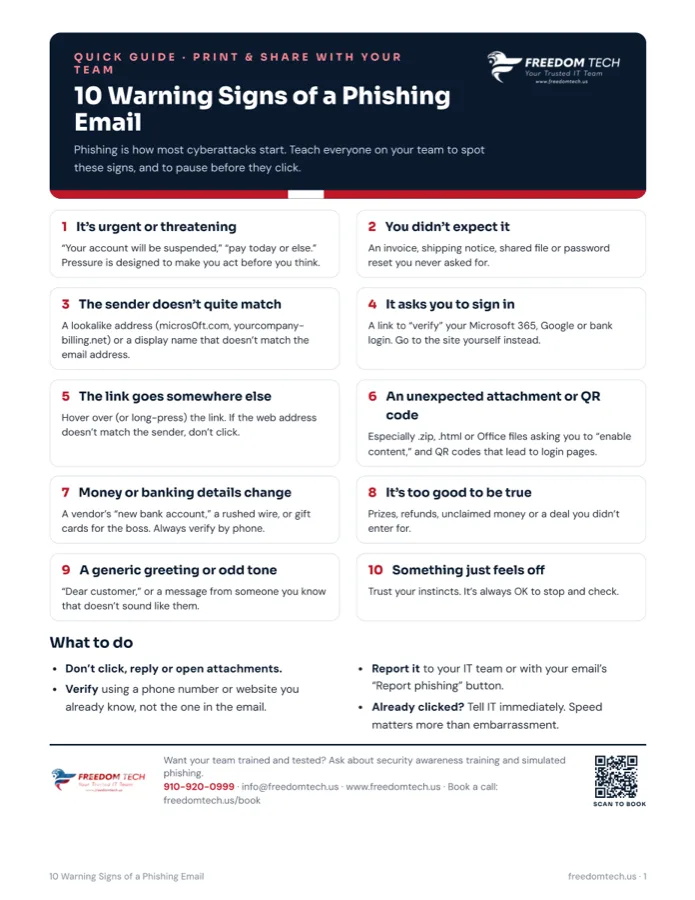
Download our free one-page Phishing Warning Signs sheet and post it where your team will see it. If you’d like help with training, simulated phishing or email security, book a 10-minute call at freedomtech.us/book or ask about our free Cybersecurity Risk Assessment.